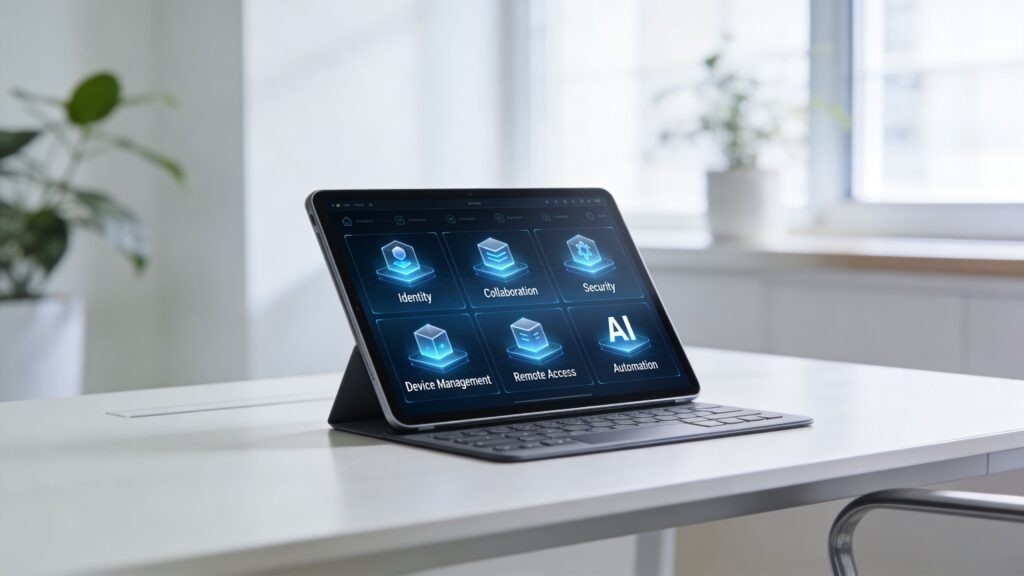
Monday starts with a login scavenger hunt. Sales lives in Microsoft 365. Design uses a different file system. Finance still depends on spreadsheets passed through email. IT is trying to secure personal laptops, company phones, and a growing list of cloud apps. Nobody feels fully blocked, but nobody feels fully supported either.
That is the core problem. Most companies don’t lack tools. They lack a cohesive working environment.
A strong digital workspace doesn’t mean buying one more platform and hoping adoption follows. It means creating one reliable place where people can access work, collaborate safely, and stay productive whether they’re at headquarters, at home, or on the road. That need isn’t temporary. Employee expectations have shifted. 91% of employees would consider leaving their jobs if remote work options were removed, and the World Economic Forum projects remote-capable digital jobs will rise by 25% to 92 million by 2030 according to Trinetix’s digital workplace guide.
For many leaders, this becomes urgent the moment growth starts exposing cracks. Hiring gets slower. Security reviews multiply. Managers complain about fragmented visibility. Employees waste energy figuring out where work happens.
If you’re evaluating digital workspace solutions alongside broader infrastructure modernization, it helps to think of them as part of the same operating model as cloud computing solutions for small business. The point isn’t novelty. The point is giving the business a cleaner way to run.
The Modern Workplace Puzzle
The hybrid workplace usually breaks in small ways before it breaks in obvious ones.
A project update sits in chat. The latest contract version sits in a shared drive. Approval happens over email. The customer record is in another system. Then someone joins from a personal device and IT has no clean way to verify posture, apply policy, or support the user without a chain of manual work.
That doesn’t mean the business chose bad software. It means software was added one decision at a time, without a design for how work should flow end to end.
Why the friction feels bigger than it looks
Leaders often see the symptoms as separate issues.
- Security issue: Unmanaged devices and inconsistent access controls
- Productivity issue: Too many tabs, too many duplicate files, too much searching
- Culture issue: Remote staff feel disconnected from decisions and team rhythm
- Support issue: IT spends time reacting instead of preventing failures
In practice, those are all one issue. The company has a fragmented digital workplace.
A digital workspace works best when employees don’t have to think about the plumbing. They should know where to start, how to access what they need, and who owns the next step.
What a solution solves
Good digital workspace solutions reduce uncertainty. They answer questions employees ask every day:
- Where do I start my workday
- How do I securely access what I need
- Which version is current
- Who can help if something breaks
- What happens if I switch locations or devices
When those answers are consistent, execution improves. When they aren’t, teams build workarounds. Workarounds always become expensive.
Beyond Apps Defining The Digital Workspace
Many companies operate what I’d call a digital garage sale. Tools are everywhere. Some are useful. Some overlap. Some were purchased for one team and then became business critical for five others.
A digital workspace is the opposite. It’s a digital headquarters. Everything doesn’t have to be in one product, but everything should feel like part of one operating environment.

The difference between cloud apps and a real workspace
Using Microsoft 365, Google Workspace, Zoom, Slack, or a line-of-business system doesn’t automatically mean you have a digital workspace. It means you have software in the cloud.
A real digital workspace coordinates four things:
Access
Users sign in once, with the right identity and permissions.Experience
Work feels consistent across laptop, phone, remote desktop, and browser.Security
Policies follow the user, device, and application. They don’t rely on office walls.Flow
Communication, files, approvals, and tasks connect instead of living in isolation.
That’s why the debate isn’t Microsoft versus Google. It’s about how your chosen stack behaves as a workplace. If you’re sorting out the foundation, a side-by-side view of Microsoft 365 vs Google Workspace is useful, but the larger decision is how those tools fit into a secure and usable employee experience.
What executives should look for
Non-technical leaders don’t need to get buried in architecture diagrams. They do need to ask better questions.
| Question | Weak answer | Strong answer |
|---|---|---|
| Where does work begin | Depends on the team | One clear starting point |
| How is access controlled | Case by case | Central identity and policy |
| How are devices managed | Mostly manual | Standardized and visible |
| What happens during issues | Users open tickets | Monitoring catches issues early |
| How do remote staff work | With exceptions | With the same confidence as office staff |
Practical rule: If your employees need tribal knowledge to find systems, approvals, or current files, you don’t have a digital workspace yet. You have a collection of subscriptions.
The Core Components Of Your Digital Ecosystem
A useful digital workspace isn’t a single feature list. It’s an ecosystem. When one layer is weak, the rest starts carrying avoidable load.
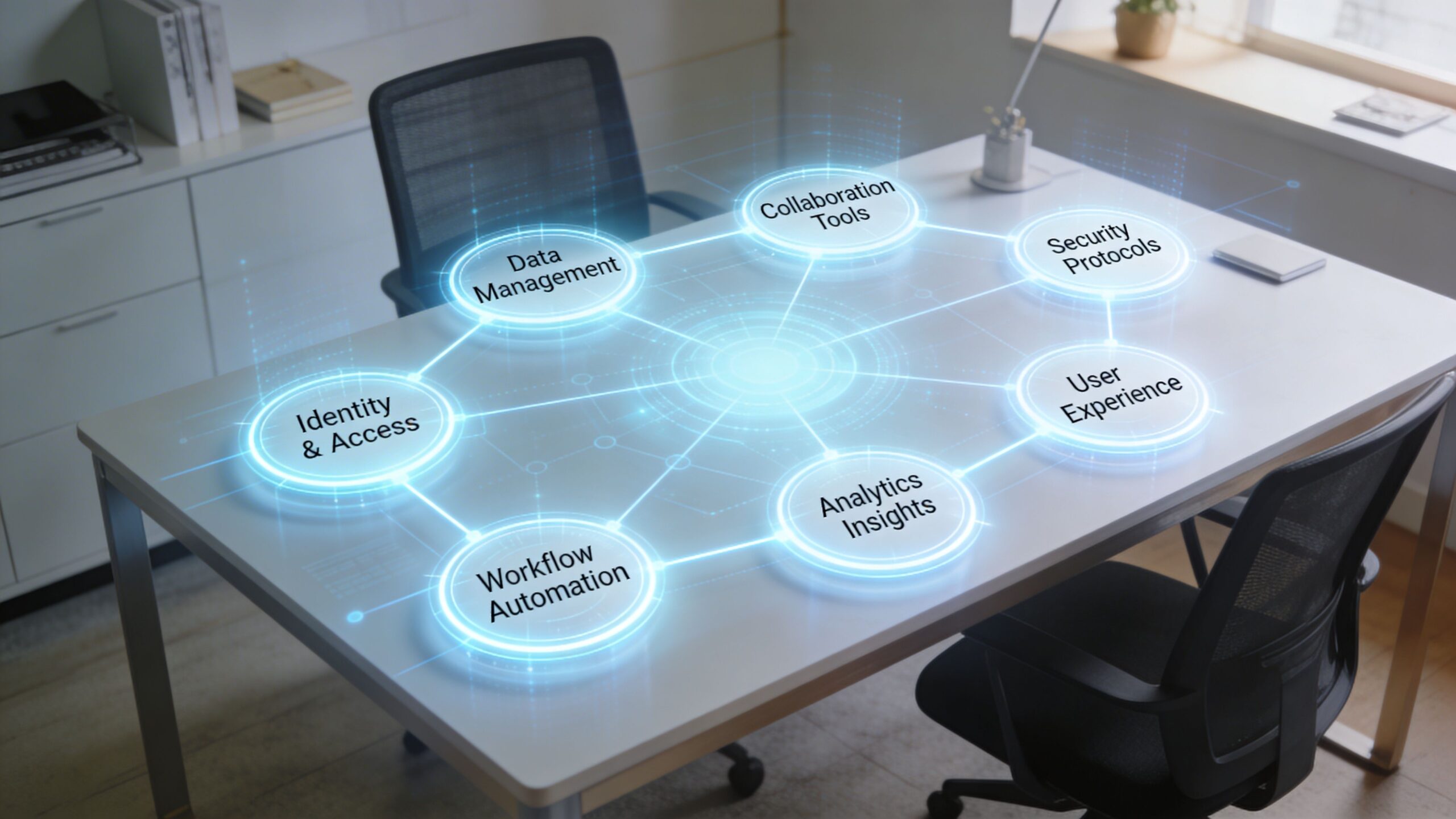
Identity and access management
This is the front door. It decides who gets in, what they can reach, and under what conditions.
In practical terms, this means a new hire shouldn’t wait on three departments to gain access to email, file storage, CRM, and payroll. It also means a departing contractor shouldn’t keep access because nobody remembered a shared credential.
Strong identity design usually includes single sign-on, conditional access, role-based permissions, and clean joiner-mover-leaver processes.
Collaboration tools
These are the rooms where work happens. Chat, meetings, shared documents, calendars, comments, and team spaces all sit here.
The mistake isn’t choosing Microsoft Teams, Google Chat, Zoom, or another platform. The mistake is leaving no rule for where decisions belong. If approvals happen in email, questions in chat, and files in a disconnected drive, context vanishes. Teams need explicit norms. For organizations using Google’s ecosystem, A Guide to Mastering Google Chat is a practical resource because it focuses on how teams communicate, not just which buttons to click.
Unified endpoint management
If identity is the front door, Unified Endpoint Management is the facilities team. It keeps laptops, phones, tablets, and other endpoints configured, compliant, and supportable.
That matters even more in hybrid environments where some devices are corporate owned and others aren’t. Patch status, encryption, approved apps, remote wipe capability, and configuration policies should be visible from one place.
Application delivery
Employees don’t care whether an app is SaaS, virtualized, browser based, or hosted in a data center. They care whether it opens quickly, works reliably, and doesn’t require odd exceptions.
This layer becomes critical when a finance platform, custom internal app, or development environment can’t be installed directly on every endpoint. A mature workspace delivers the right application to the right user in a predictable way.
Security and compliance
Security in a digital workspace has to be woven in. Bolting it on later creates friction users will route around.
That includes identity controls, endpoint policy, data protection, auditability, and access segmentation. For many firms, a zero trust security approach finds application. It replaces blanket trust with verification based on user, device, and context.
Remote access
Remote access is not just VPN. For many businesses, it’s a mix of browser access, secure application publishing, virtual desktops, and policy-based connectivity.
A good remote access design gives people continuity. They shouldn’t feel like they move from “real work” in the office to a degraded backup mode at home.
Automation and AI
This layer removes repetitive drag. Examples include onboarding workflows, automated software provisioning, access approvals, service-desk routing, and AI-assisted support.
The best use of automation isn’t flashy. It eliminates handoffs that slow execution.
Why observability often exceeds initial expectations
Fragmented environments create hidden failure points. One tool sees identity issues. Another sees device health. Another sees application performance. Nobody sees the whole picture.
Unified Digital Workspace Management Platforms consolidate observability, allowing IT teams to track performance data in real time and trigger automated fixes. This proactive approach eliminates reactive troubleshooting, directly reducing support ticket volume and accelerating mean time to resolution, as described by Flexxible’s overview of digital workspace solutions.
That’s a major operational shift. IT stops acting like emergency dispatch and starts acting like infrastructure control.
The Business Case Measuring The ROI Of Digital Workspaces
Most business cases for digital workspace solutions fail because they stay too abstract. “Better collaboration” sounds good, but it doesn’t help a CFO or COO decide.
The stronger argument is operational. A digital workspace lowers friction in places executives already measure: onboarding, support, security overhead, speed of execution, and staffing flexibility.

Where returns usually show up first
The first gains often aren’t glamorous.
- Faster onboarding: New users receive devices, access, and applications through a standard process instead of ad hoc tickets.
- Lower support burden: Standardized endpoints and centralized visibility reduce the number of avoidable incidents.
- Cleaner scale-up: Teams add staff without rebuilding IT every quarter.
- More predictable compliance: Audit and policy controls become part of normal operations instead of scramble work.
Those benefits matter most when the business is changing quickly.
Scalability is a financial argument
Infrastructure elasticity has direct business value. Organizations deploying cloud-based digital workspace solutions achieve 40% faster tool deployment rates and can handle 3x more user growth without performance degradation, according to Sowork’s analysis of digital workspace capabilities.
That kind of scalability is especially useful when staffing demand moves up and down. Companies using outsourcing support, project-based teams, seasonal operations, or distributed specialists don’t want infrastructure that has to be re-engineered every time headcount shifts.
A digital workspace lets the business scale access and support more like a utility than a construction project.
What to measure instead of vanity metrics
Avoid broad claims like “productivity improved.” Measure friction removal.
| Metric area | What to watch |
|---|---|
| Onboarding | Time from accepted offer to fully productive access |
| IT operations | Ticket patterns, recurring incidents, avoidable escalations |
| User experience | Login friction, app launch failures, access delays |
| Delivery capacity | How quickly new tools or teams can be provisioned |
| Workforce continuity | How easily staff move across locations and devices |
If you can’t show where work got easier, faster, or safer, the workspace initiative is still an IT project. It hasn’t become a business asset yet.
Why outsourcing changes the economics
A practical benefit of using an outsourcing partner from the USA is that it aligns implementation with business hours, executive stakeholders, and compliance expectations while still giving access to scalable delivery capacity. That combination matters when the workspace touches finance operations, customer support, engineering, and regulated data.
For non-technical executives, the takeaway is simple. Digital workspace solutions aren’t just about employee convenience. They support a business model that can hire, onboard, secure, and scale without constant operational drag.
Finding The Right Partner For Implementation
Choosing a partner for digital workspace solutions is less like buying software and more like choosing a long-term operating ally. The right partner will shape architecture, rollout sequence, support quality, and governance standards for years.
That matters because the market is expanding quickly. The digital workplace market is projected to grow from USD 67.57 billion in 2025 to USD 161.82 billion by 2030 at a CAGR of 19.1%, with the security and compliance segment projected to grow at 20.2% and North America holding 31.4% regional market share in 2024, according to MarketsandMarkets research on the digital workplace market. Growth like that attracts plenty of providers. Not all of them are equipped to handle enterprise risk, user adoption, and operational support at the same time.
What strong partners do differently
A capable partner doesn’t start by pushing tooling. They start by understanding your environment.
They ask how employees work, which applications are business critical, where sensitive data sits, what support model you need, and how fast the organization is likely to scale. They also tell you where trade-offs exist. For example, tighter controls may require better change management. Broader device flexibility may require clearer endpoint policy.
Digital Workspace Partner Evaluation Checklist
| Evaluation Area | Key Questions to Ask | Ideal Partner Attributes |
|---|---|---|
| Strategy alignment | Do they understand business workflows, not just infrastructure | Maps technology decisions to business operations |
| Security and compliance | How do they handle access control, device policy, audit needs, and data protection | Strong governance discipline and regulatory awareness |
| Platform expertise | Can they support Microsoft 365, cloud environments, endpoint security, and line-of-business apps together | Broad hands-on delivery capability across the stack |
| Deployment model | Can they roll out in phases without disrupting the business | Structured implementation with pilot discipline |
| Support operations | What happens after go-live, and who owns issue resolution | Clear SLAs, escalation paths, and ongoing management |
| Scalability | Can they support growth, temporary staffing, and multi-location access | Flexible resourcing and elastic delivery model |
| Communication | Will executives and managers get clear updates, not technical jargon | Strong documentation and plain-language guidance |
| Change management | How do they handle training, adoption, and user resistance | Treats rollout as an organizational change, not just a technical launch |
Why a USA-based outsourcing partner can be the better fit
There’s a practical advantage to working with an outsourcing partner from the USA when the workspace affects payroll, finance operations, customer records, and executive reporting.
- Timezone fit: Leadership, IT, and operations teams can make decisions quickly during normal business hours.
- Compliance familiarity: A USA-based partner is usually better positioned to work within U.S. privacy, contractual, and client expectations.
- Communication clarity: Executive reviews, incident updates, and rollout planning tend to move faster when communication norms are aligned.
- Operational continuity: You still get flexible delivery capacity, but without the distance that often slows escalations.
A partner should make the environment simpler over time. If their proposal increases complexity, hides ownership, or leaves support ambiguous, keep looking.
A Phased Roadmap To Avoid Common Pitfalls
Most digital workspace failures don’t come from bad intentions. They come from skipping sequence. Teams buy tools before defining workflows, launch before training, and enforce access controls before explaining how the new environment is supposed to work.
A phased roadmap avoids that.
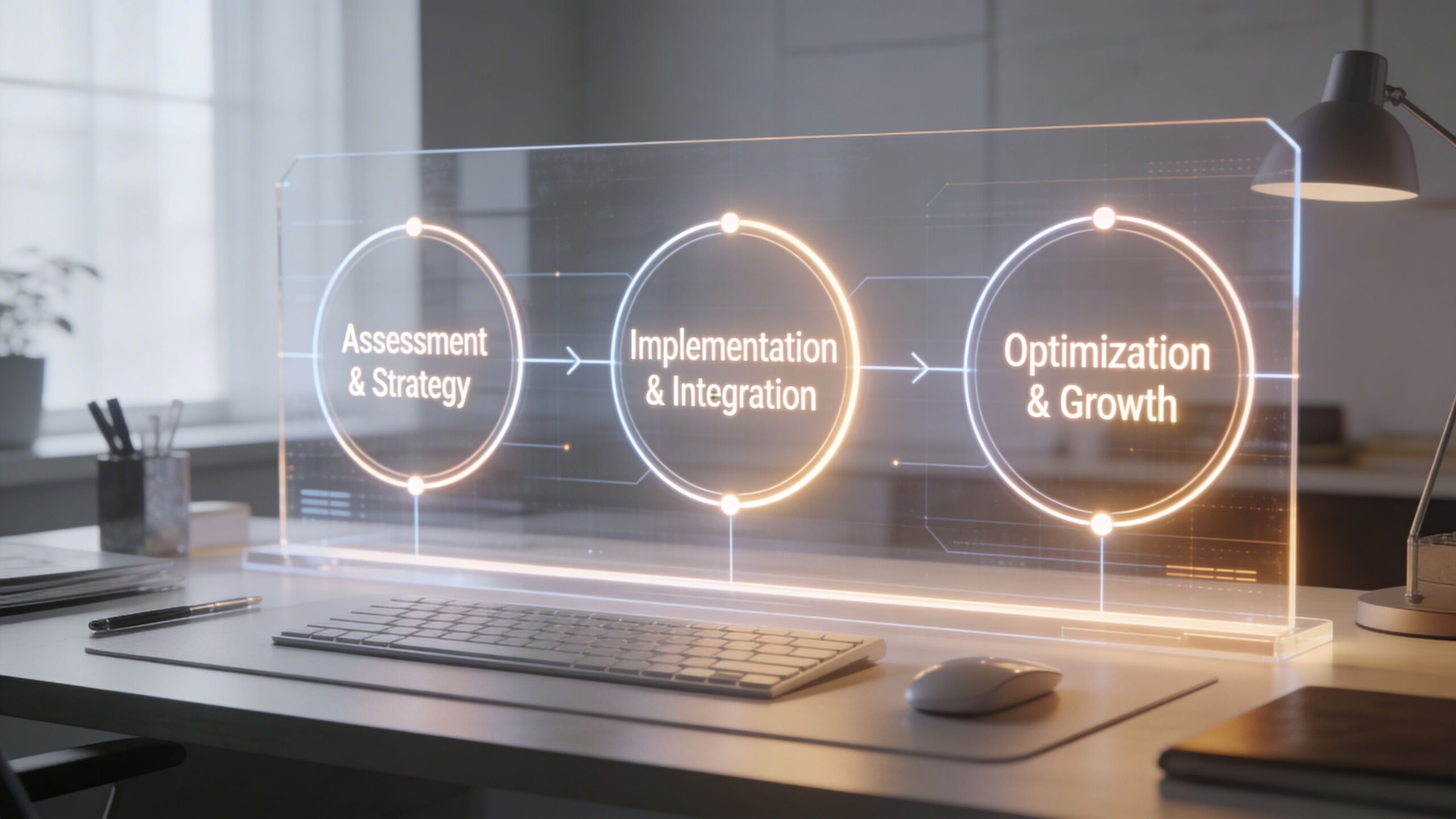
Phase one assessment and strategy
Start by documenting how work moves today.
Look at onboarding, approvals, collaboration habits, remote access patterns, support requests, and device realities. Include finance, HR, operations, and customer-facing teams. They often experience the environment differently.
Common mistake: focusing only on the IT inventory.
That produces a technically tidy plan that employees ignore.
A better assessment asks:
- Which tasks create repeated friction
- Which systems are business critical
- Which users work on unmanaged or mixed-use devices
- Where do delays, duplicate work, or access confusion happen most often
Accessibility should be included early, not treated as a later compliance task. If your workspace is difficult to use, hard to read, or inconsistent across devices, adoption drops. Teams that need a practical baseline should review the web content accessibility guidelines, especially when supporting employees with varied devices and working conditions.
Phase two pilot and deployment
Pick a pilot group that reflects real complexity. Don’t choose only power users or only headquarters staff. Include at least one team that works remotely, one team with heavier compliance needs, and one group that depends on shared documents and approvals.
Then define what “good” looks like before launch. That might include cleaner onboarding, fewer access requests, simpler collaboration norms, or better remote access continuity.
Operational advice: Pilot the workflow, not just the software. If employees still don’t know where decisions, files, and approvals belong, the rollout isn’t ready.
Common mistake: launching tools without communication rules.
That’s where the human cost appears.
Research on digital work technologies highlights stress tied to constant connectivity, and without mitigation strategies organizations risk a 25 to 30% rise in burnout, especially in distributed teams, as discussed in the Nottingham review on the dark side of digital workplace technologies.
That means every rollout should include norms such as:
- Response expectations: Define what needs immediate response and what doesn’t.
- After-hours boundaries: Clarify availability windows for distributed teams.
- Channel rules: Decide when to use chat, email, meetings, or shared documents.
- Manager behavior: Leaders should model healthy usage, not reward constant presence.
Phase three optimization and governance
Go-live is not the finish line. It’s the point where governance starts earning its keep.
Review support data, access exceptions, user feedback, and recurring bottlenecks. Retire duplicate tools. Tighten policies where needed. Simplify where controls are over-engineered.
A healthy governance rhythm usually includes:
| Area | Ongoing focus |
|---|---|
| Security | Access reviews, policy updates, incident learning |
| User experience | Login friction, collaboration habits, app reliability |
| Operations | Ticket trends, automation opportunities, device compliance |
| People | Training refreshers, manager coaching, burnout monitoring |
The best digital workspace solutions feel stable to employees because leadership keeps tuning them behind the scenes. Without that discipline, the environment slowly drifts back into a tool sprawl problem with newer branding.
Digital Workspaces In Action With NineArchs
The easiest way to understand digital workspace solutions is to see how they map to real operating problems.
A startup, an SME, and an enterprise may all say they need “better remote work tools.” In practice, they need very different combinations of access, support, security, staffing, and process redesign.
A startup scaling engineering without creating security debt
A growing product company usually hits the same wall. It needs to add developers fast, but every new hire increases provisioning work, software access requests, device management overhead, and pressure on the internal team.
The wrong response is to let everyone self-assemble their setup.
The better response is a digital workspace model that standardizes identity, application access, cloud development environments, collaboration channels, and endpoint controls from day one. That gives the startup a repeatable way to onboard full-time engineers, contractors, and specialized talent without reinventing policy each time.
For this kind of company, a partner like NineArchs fits because it combines full-stack development capacity with IT services, cloud support, Microsoft 365 experience, endpoint security, and flexible staffing. That means engineering growth doesn’t outrun operational discipline.
An SME outsourcing finance and customer support without losing control
Small and midsize businesses often think of digital workspaces as an IT topic. They become operations-critical the moment bookkeeping, invoicing, payroll support, customer service, or data entry starts moving across internal staff and outsourced teams.
Here, the workspace has to do two jobs at once. It must make outsourced work easy to access and manage, while also protecting financial data and preserving accountability.
The practical design usually includes secure identity controls, role-based permissions, shared document workflows, auditable handoffs, and clear communication rules between in-house managers and external support staff. It should also give leadership visibility without forcing them into every transaction.
NineArchs is relevant in this scenario because its BPO and virtual assistant services map directly to these processes. A company can outsource bookkeeping, payroll support, invoicing, customer service, and finance operations while keeping work inside a structured digital environment instead of scattered email chains.
An enterprise modernizing legacy IT without breaking daily operations
Enterprises face a different challenge. They rarely start from nothing. They start from too much.
There may be legacy file shares, old internal apps, mixed endpoint policies, regional IT variations, and inconsistent collaboration habits. Microsoft 365 may already exist, but not as a coherent workplace. Security controls may be present, but fragmented.
The path forward is usually phased modernization. Consolidate identity. Standardize endpoint management. Modernize application delivery. Bring Microsoft 365, cloud services, and security policies into one operating framework. Then layer in automation and better observability.
An experienced outsourcing partner from the USA is especially valuable in this situation. Large programs involve executive stakeholders, compliance reviews, cross-functional approvals, and ongoing support expectations. U.S.-aligned communication and governance can remove a lot of friction while still giving the enterprise access to scalable technical and operational capacity.
The people-centered difference
The strongest digital workspace isn’t the one with the biggest feature list. It’s the one employees can trust.
That means they can log in securely, find what they need, move work forward, and log off without feeling like the system is working against them. It also means leadership isn’t forced to choose between control and usability.
NineArchs stands out in this context because its service mix spans the full operating picture. IT services. cloud computing. Microsoft 365 licensing. endpoint security. generative AI solutions. software development. BPO. virtual assistants. skills-based staffing. That breadth matters because most workplace problems don’t sit neatly in one department.
A digital workspace is now foundational business infrastructure. The companies that treat it that way run with less friction, support distributed teams more effectively, and scale with fewer self-inflicted problems.
If you’re evaluating a practical, people-centered digital workspace with the support of a USA-based outsourcing partner, NineArchs LLC can help you align IT services, cloud infrastructure, Microsoft 365, endpoint security, BPO, staffing, and generative AI into one workable operating model. Contact the team at (310)800-1398 / (949) 861-1804 or Email: info@ninearchs.com.