
Your business probably already runs in the cloud. Your customer records live in one system. Finance works in another. Sales updates a pipeline somewhere else. Support has its own dashboard. Then someone on your team exports a spreadsheet, cleans it by hand, emails it, and hopes nothing changed in the meantime.
That's the point where many leaders realize they don't have a software problem. They have a coordination problem.
A cloud integration service solves that coordination problem. It connects the systems your company already depends on so data moves reliably, workflows run automatically, and teams stop working from conflicting versions of the truth. The catch is that integration isn't a side task for an overloaded internal IT team. It's a software development and operational support function. For most organizations, outsourcing that work to a US-based partner is the more strategic move because it reduces delivery risk, shortens decision cycles, and gives leadership a single accountable team for build, security, and remote IT support.
What Is a Cloud Integration Service
A cloud integration service is the set of tools, workflows, and engineering practices that let different business systems communicate with each other. If your CRM needs to send approved orders into ERP, if your billing platform needs customer updates from sales, or if your support team needs account data from multiple sources, integration is what makes that happen.
Think of it as a universal translator for business software.
Without it, each application speaks its own language. One system stores customer names one way, another stores account IDs differently, and a third logs transactions in a format no one else can read cleanly. Your people become the translators. They copy, paste, reconcile, and double-check. That slows operations and creates errors.

What it looks like in daily operations
A practical cloud integration service usually handles tasks like these:
- Syncing core records: Customer, product, vendor, and order data stay aligned across systems.
- Automating handoffs: A completed sales action can trigger invoicing, fulfillment, or onboarding without manual intervention.
- Reducing duplicate work: Teams don't need to enter the same information repeatedly.
- Improving visibility: Leadership can see cleaner, more consistent data across departments.
If you want a plain-language overview of the mechanics behind software connectivity, this Microsoft systems integration guide gives a useful framing of how organizations connect applications and data flows.
Why this matters now
This isn't a narrow IT specialty anymore. The cloud integration software market was valued at USD 3.83 billion in 2023 and is projected to reach USD 13.05 billion by 2032, with a 14.64% CAGR according to the cloud integration software market forecast. That tells you something important. Businesses aren't treating integration as background plumbing. They're treating it as part of modernization.
Integration stops being “technical middleware” the moment a missed sync delays invoicing, inventory updates, or customer service.
That's why business leaders shouldn't frame integration as a do-it-yourself configuration exercise. It's closer to building a digital nervous system for the company. It needs planning, software development discipline, and ongoing support. A US-based outsourcing partner often makes more sense than trying to assemble that capability from internal generalists, especially when you need business alignment, secure delivery, and dependable communication.
Common Cloud Integration Approaches
Not every integration problem should be solved the same way. Some companies need fast connections between cloud apps. Others need controlled data movement from cloud systems into internal operations. The right method depends on how many systems you run, how often data changes, and how much custom logic belongs in the middle.
Four ways teams usually connect systems
iPaaS works like a pre-wired switchboard. It gives teams ready-made connectors, authentication standards, and workflow capabilities so they don't have to custom-build every connection from scratch.
API-led integration is more like building with standard parts. Each system exposes defined services, and the integration layer orchestrates those services cleanly. This makes future changes easier because one connection doesn't require rewriting everything around it.
ETL or ELT behaves like a scheduled delivery route. Data gets collected, transformed, and moved from one place to another on a recurring basis. It's useful when businesses care more about reporting and analytics than live operational handoffs.
ESB-style integration acts as a central message hub. Systems send and receive messages through a managed middle layer, which can help in more structured environments with many dependencies.
Modern integration is generally most effective when organizations use an iPaaS or API-led layer because that approach can standardize authentication, provide pre-built connectors, and support event-driven triggers without requiring custom code for every connection, as described in the UiPath Integration Service introduction.
Comparison of Cloud Integration Methods
| Approach | Best For | Scalability | Development Effort |
|---|---|---|---|
| iPaaS | Connecting many business apps quickly | High | Moderate |
| API-led integration | Long-term flexibility and reusable services | High | Moderate to high |
| ETL / ELT | Reporting, batch sync, analytics pipelines | Moderate | Moderate |
| ESB-style integration | Structured enterprise message routing | Moderate to high | High |
Where leaders often get confused
Many executives hear “integration” and assume all options are interchangeable. They aren't.
- If speed matters most, an iPaaS model is often easier to launch.
- If business logic will keep evolving, API-led design usually ages better.
- If your main concern is dashboards and reporting, batch-oriented data movement may be enough.
- If your environment has many legacy dependencies, a central broker model may still fit parts of the infrastructure.
For a useful example of how a service can plug into broader business workflows, this page on how EnvManager connects to your stack is a good reminder that integration design should start with the operating environment, not just the connector itself.
A strong architecture also depends on patterns. Teams that skip this step often create brittle one-off links. This overview of integration design patterns is helpful because it shows why message routing, transformations, and event handling need structure before development starts.
The cheapest-looking integration approach often becomes the most expensive one when every new app requires custom rework.
Outsourcing proves valuable. An experienced US-based development partner can match the approach to the business model, instead of letting internal teams accumulate improvised connections that are hard to maintain later. That reduces operational overhead and keeps future software development from turning into cleanup work.
Designing a Resilient Integration Architecture
Connecting two systems is easy to describe and hard to do well repeatedly. The difference between a stable environment and a fragile one usually comes down to architecture.
A resilient integration architecture is less like a cable between applications and more like a city plan. Roads, traffic rules, service routes, and inspection points all need to exist before the city grows. If every new building creates its own unofficial path, congestion follows. In integration, that congestion shows up as duplicate logic, hidden dependencies, inconsistent data handling, and workflows no one fully owns.

What resilient design includes
A durable architecture usually includes several planned layers:
- Data mapping: Teams decide how records relate across systems before syncing begins.
- Workflow orchestration: Business actions trigger the right sequence of system events.
- Error handling: Failed transactions are captured, retried, routed, or reviewed instead of disappearing.
- Observability: Support teams can see what ran, what failed, and what changed.
- Governance controls: Naming rules, ownership, access policies, and change management stay consistent.
Modern integration stacks need governance across hybrid and multi-cloud environments to prevent integration sprawl. The challenge isn't just getting systems connected. It's enforcing policies and resilience as businesses add more SaaS, data platforms, and automation layers, as explained in this cloud integration governance overview.
Why architecture fails in real companies
Most failures don't start with bad intent. They start with urgency.
A team needs one sync for finance. Another wants a quick onboarding workflow. Sales asks for customer updates to flow into support. Each request looks reasonable. After enough “quick fixes,” the company ends up with a web of dependencies that no one wants to touch.
That's why architecture should answer a few practical questions early:
- Who owns each integration flow after launch?
- Which systems are the source of truth for each data type?
- What happens when data arrives late, incomplete, or duplicated?
- How are policy changes rolled out without breaking dependent workflows?
If your environment includes collaboration platforms and cloud services that can throttle or restrict heavy request patterns, technical edge cases matter too. This article on preventing throttling in SharePoint Azure scenarios is a useful reminder that resilient architecture has to account for platform behavior, not just business logic.
A good integration architecture doesn't eliminate change. It makes change predictable.
This is one reason outsourcing the build to a US-based partner is often the smarter route. You're not just hiring developers to connect systems. You're bringing in a team to define standards, document dependencies, and create a supportable operating model. That matters even more when remote IT support will inherit the environment after go-live.
Security and Governance for Your Integrated Data
The moment systems start sharing data automatically, the risk profile changes. A manual process may be slow, but it limits exposure. An integrated environment moves faster, which means mistakes can spread faster too.
That's why security in a cloud integration service has to be designed into the workflow, not added after deployment.

The biggest security risks
Three risks show up repeatedly in integration programs.
- Weak access control: If too many people or services have broad permissions, a single mistake can expose sensitive business data.
- Poor secret handling: API credentials, tokens, and connection keys need controlled storage and rotation.
- Invisible failures: If no one sees failed jobs, partial syncs, or unauthorized access patterns, issues linger unnoticed.
- Unclear ownership: When no team owns monitoring and response, governance becomes paperwork instead of practice.
Modern integration platforms collect key metrics, logs, metadata, and audit trails, which matters because that visibility supports monitoring and governance across many connected systems, as outlined in the SAP Cloud Integration documentation summary.
What strong governance looks like
Security controls work best when they're operational, not theoretical.
- Least-privilege access: Every user, service account, and workflow gets only the permissions it needs.
- Auditable changes: Configuration updates, failed runs, and data movement should leave a trail.
- Policy enforcement: Naming standards, approval paths, and deployment rules should be consistent.
- Support readiness: Someone has to review alerts, investigate anomalies, and coordinate remediation.
For leaders thinking about policy maturity, this resource on governance in the cloud is a good reference point because it connects cloud controls to day-to-day operating decisions.
Practical rule: If your support team can't answer who accessed what, when it moved, and why it failed, governance isn't complete.
Expert remote IT support changes the outcome. Security isn't just about the original software build. It's about review, alerting, patching, access hygiene, and incident response after launch. A US-based outsourcing partner can provide tighter communication with business stakeholders, clearer escalation paths, and stronger alignment around compliance expectations than a loosely coordinated mix of freelancers or ad hoc internal ownership.
An Implementation Roadmap for Success
A leadership team approves a cloud integration project because the goal sounds simple. Connect the CRM, ERP, support platform, and a few reporting tools. A few months later, the team is sorting through missed records, duplicate updates, and unclear ownership. The problem usually is not the idea of integration. The problem is treating implementation like a quick setup task instead of a business change program.
A better roadmap works like planning a new distribution network. You do not start by buying trucks. You start by deciding what needs to move, where it should arrive, who is accountable, and how delays will be handled. Cloud integration follows the same logic.
For medium-complexity integration between cloud applications and other business systems, projects can stretch across many months because teams must handle data mapping, connector configuration, testing, and compliance preparation before rollout, according to a cloud application integration overview from ScienceSoft.
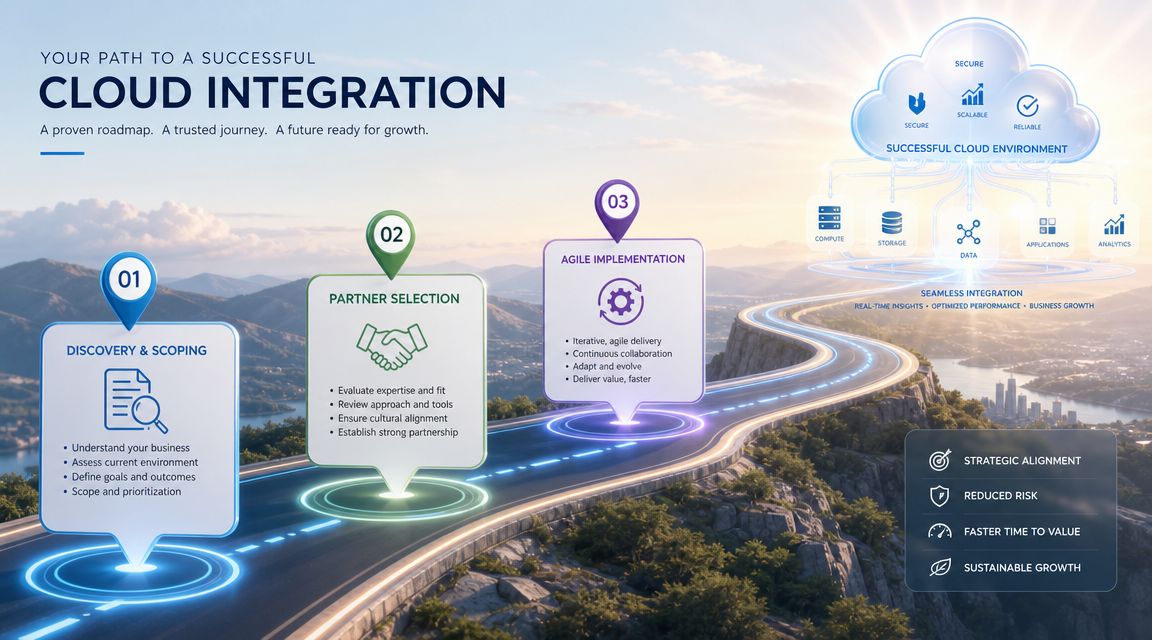
Phase 1 discovery and scoping
Start with operating reality.
That means tracing how work moves through the business today. Which systems create customer records? Which team corrects errors by hand? Which approvals happen in email because systems do not talk to each other? Those answers shape the integration plan far better than a list of desired connectors.
This phase should produce a short set of decisions leaders can act on:
- System inventory: The applications, databases, and services in scope
- Data ownership model: The system of record for each major data type
- Risk register: Compliance, dependency, security, and support concerns
- Delivery priorities: The integrations that should launch first based on business value
A capable outsourcing partner is useful early because discovery is where expensive mistakes start. If internal teams scope the work too loosely, development slows down later and support costs rise after launch.
Phase 2 partner selection and architecture
Architecture decisions shape cost long after go-live.
If a company waits to bring in an implementation partner until after internal teams sketch a design, the result is often a messy handoff. Documentation is thin, assumptions are buried in workflow logic, and the partner has to reverse-engineer choices before building anything dependable.
Bringing in a US-based outsourcing partner at this stage is usually the more strategic move. The partner can help set integration patterns, naming standards, testing rules, and support expectations before code starts to accumulate. That reduces rework and shortens the path to usable software. For leaders who want that decision connected to broader planning, this guide to cloud consulting services for business and technology alignment gives helpful context.
Phase 3 agile build and controlled testing
Build in small releases with visible business checkpoints.
One workflow is implemented, validated, and refined before the next one follows the same pattern. That approach works because integrations behave like plumbing behind the walls. Once hidden complexity is covered up, fixing mistakes becomes slower and more expensive.
Testing also needs to reflect real operating conditions, not just happy-path data transfer. Teams should verify:
- How records map in edge cases
- What happens when a source or target system is temporarily unavailable
- Whether repeated events create duplicate transactions
- How support staff will detect, classify, and resolve failures
This is another reason outsourcing pays off. A seasoned US-based partner has usually seen these failure patterns before and can design tests around them, which helps the business avoid paying its own team to learn by trial and error.
Phase 4 deployment and remote support
Deployment should happen in stages, starting with lower-risk workflows where business impact is easy to measure and rollback is manageable.
After launch, the work shifts from building to operating. Monitoring, access reviews, issue response, patching, and controlled enhancements become part of the normal cost of ownership. Companies that try to absorb all of that internally often discover that the project did not really end. It changed shape.
Outsourcing that ongoing responsibility to a US-based partner is often the more cost-effective choice because it gives the business continuity, clearer accountability, and faster response without forcing internal teams to become full-time integration operators.
Many integration programs weaken after deployment because support ownership is unclear. Once that happens, small failures turn into reporting gaps, process delays, and manual repair work.
How to Choose the Right Integration Outsourcing Partner
Most firms can write code. That isn't the hard part. The hard part is building integrations that remain stable, governable, and supportable when the business adds more systems and more automation.
A good selection process should feel less like hiring developers and more like choosing an operating partner.
What to look for
Use this checklist when evaluating candidates:
- Architecture depth: Can the team explain when to use APIs, event flows, batch movement, or hybrid models in plain business terms?
- Software development discipline: Ask how they handle versioning, testing, change control, and documentation.
- Remote IT support capability: Someone has to monitor integrations, investigate failures, and manage ongoing updates.
- Security maturity: They should have a clear process for access control, logging, credential handling, and audit readiness.
- Business communication: If they can't translate technical risk into operational language, leadership will struggle to make decisions.
For a broader lens on strategic advisory support, this guide to cloud consulting services is useful because it highlights how infrastructure decisions and business goals need to stay connected.
Why a US-based partner changes the outcome
A US-based outsourcing partner offers advantages that business leaders often underestimate.
Communication is faster because meetings happen in overlapping business hours. Legal and IP expectations are usually easier to align. Escalations move faster because the support model matches your operating day. Product owners, finance leads, and technical stakeholders can resolve blockers without waiting for overnight handoffs.
That doesn't mean global delivery has no place. It means accountability should sit where your business can reach it quickly.
A strategic partner should also be willing to challenge bad assumptions. If your internal request is “just connect these systems,” the right team should ask about ownership, exception handling, and support implications before writing a line of code. That discipline is often what makes outsourcing more cost-effective than building piecemeal integrations in-house.
Frequently Asked Questions About Cloud Integration
A familiar pattern plays out in growing companies. Sales updates one system, finance works from another, operations keeps a spreadsheet on the side, and leadership waits for someone to reconcile the differences. Cloud integration fixes that coordination problem, but the bigger business question is who should design and run it.
Why outsource cloud integration instead of building it in-house
Cloud integration works like traffic control for your business systems. Data has to arrive at the right place, in the right format, at the right time, with rules for exceptions, security, and auditability. That takes more than development time. It takes architecture, testing discipline, operational support, and clear ownership.
An internal team can handle some of that work, but many companies already rely on those same people to keep daily operations stable. Pulling them into integration projects often slows product delivery and creates fragile connections that become expensive to maintain. A specialized outsourcing partner gives you a team built for this function from day one. For many business leaders, that is the more strategic path because it speeds execution and avoids the cost of building a full integration capability in-house.
What's the real business value of a cloud integration service
The clearest value is operational clarity.
Teams spend less time re-entering data, correcting inconsistent records, and chasing approvals across disconnected systems. Leaders get reporting they can trust because information follows a defined path instead of passing through inboxes and spreadsheets. Product and engineering teams also benefit. When core systems are connected properly, software development moves faster because developers are not constantly writing one-off fixes for data gaps and manual workarounds.
That reduction in friction lowers overhead in a very practical way. Fewer manual steps usually means fewer errors, fewer support tickets, and less time spent on reconciliation.
Is outsourcing really more cost-effective
In many cases, yes, especially over time.
A do-it-yourself project can look cheaper because it appears to use staff you already have. The problem is that the visible cost is only part of the picture. Delays, undocumented logic, weak monitoring, support gaps, and rework often push the actual cost much higher. If one integration fails during billing, fulfillment, or customer onboarding, the business pays for that disruption quickly.
An experienced partner is often more cost-effective because they bring a repeatable delivery model, clearer documentation, and support processes that reduce cleanup work later.
Why choose a US-based outsourcing partner
Geography affects execution more than many companies expect.
A US-based partner usually gives your leadership, operations team, and technical stakeholders overlapping business hours, faster decisions, and simpler escalation paths. That matters when integrations affect financial reporting, customer records, revenue operations, or compliance reviews. Questions get answered in the same business day. Problems are discussed with the people who own the process, not handed off across long time gaps.
There is also a strategic advantage in communication. A strong US-based partner can explain technical tradeoffs in business terms, which helps leadership make sound decisions without getting buried in implementation details.
What should I do first if my systems are disconnected
Start with the workflow that wastes the most time or creates the most business risk.
Look for handoffs where employees export spreadsheets, copy information between systems, correct mismatched records, or wait on another department to update a status manually. Those are usually the places where integration creates the fastest return. You do not need to connect everything at once. You need a sensible first target, clear ownership, and a partner who can map the process before building it.
How do I know if I'm ready
You are ready when disconnected systems are slowing decisions, increasing manual work, or making reporting hard to trust.
You do not need a perfect internal plan before starting. You need enough visibility into the problem to define priorities. A good outsourcing partner can help assess the current state, sequence the work, and build an integration model that your team can support after launch.
If your business is juggling disconnected systems, manual workarounds, and rising operational overhead, NineArchs LLC can help you evaluate the right cloud integration path and support model. To discuss outsourcing, software development, or remote IT support, call (310)800-1398 or (949) 861-1804 or email info@ninearchs.com.