

Your team is probably feeling it already. Customers are emailing about billing issues, app errors, login failures, account setup, and feature questions. Sales wants faster follow-up. Product needs cleaner feedback. Engineering is getting dragged into tickets that should never reach them. Meanwhile, leadership is trying to grow the business while support work keeps eating the day.
That's the point where many companies make a bad decision. They either keep everything in-house far too long, or they outsource support as a cheap side function and wonder why quality slips.
The smarter move is to treat support as part of your operating model. Not a separate department. Not a dumping ground. Outsourced customer support works when it connects directly to software development, remote IT support, knowledge management, and service operations. It should protect your internal team's time, improve issue resolution, and create a cleaner path from customer problem to technical fix.
Introduction Beyond the Call Center

Monday starts with a backlog. By noon, your support lead is triaging login issues, a developer is answering account access tickets, and your operations manager is trying to calm down an angry customer whose problem is really a permissions error. That is not a support problem alone. It is an operating model problem.
Leaders get into trouble when they treat outsourced customer support as a call-answering function purchased after the team is already overloaded. That approach creates handoff gaps, weak accountability, and slow resolution. Support works better when it is built into the systems behind the customer experience, including software maintenance, remote IT support, documentation, and escalation paths.
For companies with software products, recurring service requests often reveal deeper issues. A billing question may trace back to a product workflow. A failed login may require IT intervention. A spike in "how do I do this?" tickets usually points to onboarding, UX, or training problems. If your outsourced team cannot work across those lines, you are paying for message relay, not problem solving.
That is why a US-based partner can be the right choice.
The advantage is not geography by itself. It is tighter alignment with business hours, clearer communication with customers and internal teams, stronger familiarity with service expectations, and faster coordination with product, engineering, and IT stakeholders. If your company serves US customers or runs a US-led operation, those details affect response quality every day.
What leaders should expect from outsourced support
A support partner should do more than clear tickets. It should fit into the way your business runs and reduce the drag on your internal team.
A strong model should help you:
- Protect specialist time: Engineers, product managers, and IT staff should handle root causes and complex exceptions, not repeat the same front-line answers all week.
- Improve issue routing: Customer questions need to reach the right owner fast, whether that is billing, support, software, or infrastructure.
- Create better operational feedback: Repeated tickets should expose broken workflows, missing documentation, and product defects your team can fix.
- Support customers across channels: Email, chat, help desk requests, and account issues need one consistent process, not separate mini-teams with different standards.
- Strengthen service continuity: Coverage should hold up during launches, hiring gaps, seasonal spikes, and after-hours incidents.
One rule is simple. If customer support, software development, and remote IT support operate in separate lanes, customers will feel the seams immediately.
Outsourcing support pays off when it is treated as part of a broader technology and operations strategy. Get that right, and you do not just reduce ticket pressure. You build a cleaner system for serving customers, fixing recurring issues, and scaling without exhausting your core team.
The Strategic Value of Outsourcing Support

A company usually reaches the outsourcing decision at the same moment internal cracks start showing. Support queues grow. Engineers get pulled into repetitive tickets. IT staff spend too much time resetting access, troubleshooting endpoints, and chasing issues that should have been handled at the front line. That is not just a support problem. It is an operating model problem.
Treat outsourced customer support as part of your wider technology and operations strategy. That is the right frame, especially if your customer experience depends on software performance, account configuration, device access, or business-hours responsiveness. A US-based partner often has the clearest advantage here because it reduces handoff delays, improves communication with internal teams, and keeps customer conversations closer to your brand standards.
The market reflects that demand. A market roundup noted that the global outsourced customer experience market is projected to reach $132.05 billion in 2026, while the broader outsourcing services market is projected to reach $1.02 trillion in 2026. The same roundup also reported that customer service remains one of the most frequently outsourced business functions and that companies often pursue outsourcing for meaningful cost savings. Those numbers matter less than the reason behind them. Companies are buying coordination, coverage, and operational discipline, not just cheaper labor.
That distinction matters.
The strongest outsourced support models do four jobs well:
- Add capacity fast: You can expand coverage without waiting through a full hiring cycle, internal training ramp, and new manager overhead.
- Connect support to technical teams: Good providers handle front-line service while routing product bugs, access issues, and infrastructure problems to the right internal owner with context.
- Support multiple channels under one process: Email, chat, phone, and ticketing work better when one team follows shared standards. If you are reviewing service design options, this guide to voice process support models helps clarify how channel coverage should fit your operation.
- Absorb volatility: Product launches, outages, migrations, and seasonal spikes stop overwhelming the business when support capacity can scale with demand.
For software-driven companies, outsourced support should feed the product and IT roadmap. Repeated complaints about onboarding, permissions, integrations, or failed workflows point to fixes in the product, documentation, or infrastructure. That feedback loop is where outsourcing starts to produce real business value.
Technology choices matter too. Support teams need call routing, queue visibility, ticket history, and escalation controls that fit the way your company functions. If your operation still relies on disconnected tools, start by finding the right call management software before volume increases.
Leaders should still be skeptical. Quality drops when providers over-script agents, isolate support from engineering, or allow weak access controls. Those failures are common, and they are preventable.
What fixes them is straightforward:
| Risk area | What goes wrong | What fixes it |
|---|---|---|
| Brand voice | Agents sound generic and miss nuance | Clear playbooks, QA reviews, and regular calibration with your internal team |
| Security | Too many people have too much access | Role-based permissions, audit logs, and limited system access by task |
| Escalation | Technical issues bounce between teams | Defined paths into software, IT, and account owners with response targets |
| Service quality | Replies are fast but unhelpful | Resolution standards, coaching, ticket audits, and direct manager oversight |
The wrong partner adds another layer between you and the customer. The right partner gives your business more control because work is documented, routed, measured, and improved with discipline.
This is the strategic value. You are not outsourcing responsibility. You are building a support function that works in step with software development, remote IT support, and the rest of your operation.
Choosing Your Customer Support Service Model
The best service model depends on how your business runs, not on what sounds cheapest. If your support function touches software bugs, remote device access, account permissions, or implementation workflows, your model has to support real-time coordination. If your issues are more repetitive and transactional, you can push more volume to a standardized setup.
Onshore, offshore, or hybrid
A lot of leaders start with geography because it affects communication, customer expectations, and management overhead. That's the right instinct.
Here's the practical comparison:
| Factor | Onshore (e.g., USA) | Offshore (e.g., Asia) | Hybrid |
|---|---|---|---|
| Customer communication | Strong cultural and language alignment | Can vary by market and training depth | Flexible by issue type |
| Collaboration with internal teams | Easier real-time coordination | More handoff management | Best when routing is disciplined |
| Legal and compliance comfort | Simpler for many US firms | Requires more diligence | Split by data sensitivity |
| Cost structure | Higher | Lower | Balanced |
| Best fit | Complex support, brand-sensitive work, technical coordination | High-volume routine support | Growing companies with mixed needs |
A USA-based outsourcing partner has a clear advantage when support needs to connect tightly with software development and remote IT support. Time-zone alignment helps with same-day escalation. Shared business context improves conversations with customers. Legal review, data privacy discussions, and contract management are usually simpler for US companies working with a US-based partner. If your support team needs to talk to your developers, implementation staff, or internal IT team in real time, onshore support saves friction every week.
BPO versus dedicated assistant-style support
Geography is only half the decision. Structure matters just as much.
A traditional BPO setup usually works well when you have repeatable workflows, standard operating procedures, and higher ticket volume. It's a process-heavy model. If you're evaluating that route, this overview of voice process in BPO gives a useful snapshot of how voice-based service operations are typically organized.
A more dedicated assistant-style model can make sense for startups and smaller firms that need support staff to act like an extension of the company. That's often better for lower volume, more context-heavy work such as onboarding help, order follow-up, scheduling, internal coordination, and founder-support tasks.
Match the model to the work
Don't put every support request into the same queue. Split by complexity and business impact.
- Routine customer contacts: Order status, password help, subscription questions, basic account updates.
- Technical support tasks: Login failures, installation problems, permissions, user environment issues, software troubleshooting.
- Operational requests: Billing clarifications, documentation, internal routing, follow-up coordination.
- High-value escalations: Product defects, integration failures, security concerns, customer churn risks.
If you're building or rebuilding your phone and queue architecture, a practical step is finding the right call management software before you finalize staffing. Bad routing creates avoidable workload, and no outsourcing model can fix a broken intake system.
Your service model should reduce noise, not just reassign it.
Selecting the Right Outsourcing Partner
A support provider will shape your customer experience, your internal workload, and your incident response speed. Choose one that can work across support, software, and IT operations, especially if your team already depends on shared systems, product releases, and remote troubleshooting. A US-based partner often has a practical advantage here. Time-zone overlap is better, communication is faster, and escalation across leadership, engineering, and IT happens with less delay.
Start by testing operational fit, not sales polish.
A good partner should be able to explain how they handle queue swings, how they work inside your systems, and how they pass technical issues to the right internal team without losing context. If support regularly touches product bugs, access issues, device problems, or cloud configuration, the partner must be able to coordinate with software developers and remote IT staff as part of one operating model.
Use this checklist during evaluation:
- System fit: Can they work inside your help desk, CRM, documentation tools, and admin environments without adding duplicate steps?
- Escalation quality: Can they route issues to IT or engineering with clear notes, reproduction details, and the right priority?
- Training method: How do they teach product knowledge, policy rules, edge cases, and tone standards?
- Security controls: Review access permissions, device requirements, account handling rules, and incident response procedures.
- Management rhythm: Ask who owns QA, reporting, coaching, and weekly service reviews.
Then push past generic discovery questions. Ask for examples from live operations.
- How do you decide what frontline agents can solve on their own?
- What information must be attached before a ticket goes to engineering or remote IT?
- How do you update agents when software features, workflows, or policies change?
- What happens when volume spikes or a release causes a surge in support requests?
- How do you review quality beyond first-response speed?
- How do you restrict customer data access by role?
- What will leadership see in weekly and monthly reporting?
If a provider gives vague answers here, expect confusion later. The first serious failure usually hits when one customer issue crosses billing, app behavior, and device access at the same time.
Procurement discipline matters too. Teams tightening vendor handoffs and service ownership should review this guide on optimizing vendor management processes. Weak onboarding creates bad habits early, and those habits show up later as slow escalations, inconsistent service, and finger-pointing.
Fit still matters. It just needs to be defined in operational terms. Your partner's communication style should match your business, but the bigger question is whether they can function as part of your broader operating system. If you need a useful benchmark for provider structures and service depth, review these customer service outsourcing company options with that wider lens in mind.
One practical example is NineArchs LLC, which combines outsourcing, software development, and remote IT support under one operating umbrella. That setup makes sense when customer support is tied to application changes, cloud operations, Microsoft 365 administration, or endpoint management. In that case, you are not buying extra ticket coverage. You are building a tighter execution layer across customer service and technical operations.
Your Implementation Roadmap From Onboarding to Integration
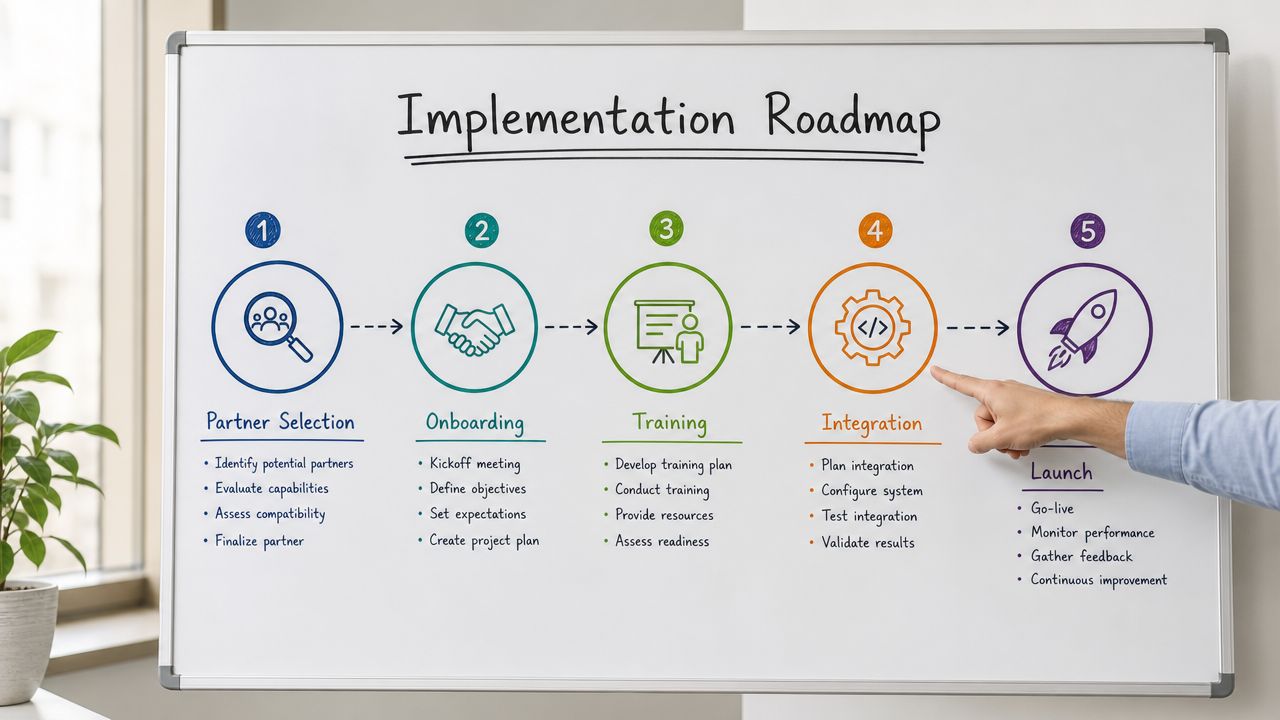
Monday morning. Your new support partner is live. By noon, a billing question turns into an app-access issue, then into a permissions problem tied to Microsoft 365, and nobody agrees on who owns the fix. The provider is waiting for guidance, your internal team is digging through old docs, and the customer is still stuck.
That failure starts in implementation, not in the contract.
If you want outsourced customer support to work, build it like an operating system that connects service, software, and IT. That matters even more if you want the responsiveness and business context a US-based partner can provide across customer conversations, engineering coordination, and remote technical support.
Build the knowledge base before go-live
Do not start with shadowing sessions and hope for the best. Start with documentation that tells agents what to do, what to ask, and where to send the issue next.
Your base set should include:
- Issue libraries: repeat questions, known failures, billing events, account changes, and approved responses
- Decision rules: what frontline agents can resolve, what needs approval, and what must move to technical teams
- Brand standards: tone, phrasing, escalation language, and risky statements to avoid
- Technical references: login flows, system dependencies, permission logic, device requirements, and recurring environment problems
Written guidance reduces improvisation. It also gives your software and IT teams a cleaner input stream when cases need deeper investigation.
Train agents to diagnose, not just reply
Script training creates shallow support. Real training builds judgment.
Agents should understand customer goals, common workflows, account structures, product edge cases, and the exact details needed for escalation. If a customer reports a bug, integration failure, or access problem, the support team should capture the environment, steps to reproduce, user role, recent changes, and business impact before passing it on.
That one habit improves resolution speed across the whole company.
It also separates mediocre outsourcing from an operation that supports growth. A partner that also works alongside software development and remote IT teams can shorten the gap between customer report and technical fix, especially when time zones, language nuance, and handoff quality matter to your business.
Define tiers with clear ownership
A tier model only works if each tier has a specific job and a specific owner. Keep it simple.
| Tier | Purpose | Typical owner |
|---|---|---|
| Tier 0 | Self-service and answer deflection | Help center, FAQs, guided workflows |
| Tier 1 | Routine customer requests and repeatable issues | Frontline outsourced support |
| Tier 2 | Technical troubleshooting and deeper investigation | Remote IT or specialized support staff |
| Tier 3 | Product defects, advanced configuration, code-level issues | Internal developers or product specialists |
This structure protects engineering time and gives customers a faster path to the right team. It also prevents the common mess where Tier 1 logs tickets, Tier 2 asks basic questions again, and Tier 3 receives incomplete cases with no usable diagnostic detail.
Support, IT, and development need one shared escalation map. A connected customer service model helps by tying customer context, workflows, and technical ownership together instead of splitting them across separate teams and systems.
Roll out in controlled phases
Do not switch every queue on at once.
Start with one issue category, one channel, or one customer segment. Review live tickets daily. Check whether agents are using the knowledge base correctly, collecting the right details, and escalating with enough context for technical teams to act. Fix the weak points, then expand scope.
A phased rollout gives you room to correct routing mistakes early. It also shows whether your US-based partner can handle more than polite replies. You want proof that they can work inside your broader operating model, coordinate with internal developers, and support remote IT workflows without creating extra friction.
Put integration owners on both sides
Every outsourced support launch needs two named operators. One person on your side. One person on the provider side.
Those owners should review open questions, approve documentation changes, track escalations that cross departments, and remove blockers fast. Without that structure, support drifts into a side function. With it, support becomes part of execution across customer service, software releases, and day-to-day IT operations.
Measuring Success With KPIs SLAs and Continuous Improvement

A support team can hit response targets all month and still create churn, rework, and engineering noise.
That happens when leaders track speed but ignore resolution quality, escalation discipline, and cross-team impact. If outsourced customer support is part of your broader operating model, your scorecard has to show whether support is helping software teams, reducing avoidable IT load, and protecting the customer experience.
Measure the outcomes that matter
Start with a simple rule. If a metric does not help you improve staffing, training, workflow design, or escalation quality, it does not belong at the center of the dashboard.
Your KPI stack should answer five operational questions:
- Are customers getting answers they can use? Track resolution quality, not just reply speed.
- Are issues staying in the right tier? Measure containment rate so frontline agents handle what they should and escalate what they should not.
- Are the same problems coming back? Repeat-contact rate exposes weak troubleshooting, poor documentation, or rushed replies.
- Are handoffs helping technical teams act fast? Review escalations for completeness, reproduction steps, account context, and diagnostic detail.
- Is performance improving month to month? Calibration, coaching, and QA trends matter more than one strong reporting period.
Support metrics should also connect to the rest of the business. If your outsourced team is doing its job, internal developers spend less time chasing missing ticket details. Remote IT support gets cleaner intake. Product teams see clearer patterns in defects, access problems, and onboarding friction. That is the core value of a mature support operation.
A US-based partner often has an edge here because alignment is easier. Shared working hours, clearer communication with internal teams, and closer familiarity with customer expectations usually produce faster decisions and fewer broken handoffs. That matters more than a slightly cheaper hourly rate.
Write SLAs that govern behavior
An SLA should control execution. It should not sit in a folder as a sales document.
Write it so there is no confusion about who owns the issue, when it moves, what information must travel with it, and how misses get reviewed. Good SLAs prevent the familiar failure pattern where support says engineering is slow, engineering says the ticket is unusable, and the customer waits in the middle.
Your SLA should cover:
| SLA area | What to define |
|---|---|
| Scope | Which channels, queues, languages, and issue types are included |
| Response expectations | Initial handling standards by channel and issue severity |
| Resolution ownership | What support owns, what IT owns, what engineering owns |
| Escalation rules | Trigger points, routing path, required diagnostic information |
| QA process | Review cadence, scorecards, coaching approach |
| Reporting | Weekly operational reports and monthly performance reviews |
| Security | Access controls, data handling, incident reporting obligations |
Review the SLA against real tickets, not just internal assumptions. If the document looks clean but live cases still bounce between support, IT, and development, the problem is the SLA.
Use AI carefully
AI can improve support operations fast. It can also make a weak operation harder to detect.
Use it for ticket tagging, suggested replies, knowledge retrieval, summarizing long threads, and routing repetitive requests. Keep humans in charge of judgment, escalation decisions, and any interaction where trust, revenue, or business continuity is at stake.
That is especially important in software and IT support. Customers may accept automation for password resets or status checks. They will not accept being trapped in a bot loop when an integration fails, a user loses access, or a product defect blocks work.
Strong teams use AI to reduce friction, not to dodge ownership.
The right model is usually blended. Automation organizes the work. Agents solve the issue. IT or engineering steps in when the problem moves into systems, permissions, infrastructure, or code. That structure keeps support connected to the rest of your operation instead of turning it into an isolated vendor queue.
Real-World Examples and Your Next Steps
A startup usually hits the wall first. The founder answers customer emails between product meetings, invoicing, and hiring. Support quality depends on who is awake and available. In that situation, a dedicated outsourced support resource can handle inbox triage, account questions, order follow-up, and knowledge-base updates. The result isn't just lower pressure. It's cleaner founder focus.
An SME tends to run into a different problem. Growth creates uneven demand. Some weeks are manageable. Other weeks bring onboarding surges, software questions, and after-hours support gaps. A hybrid model works well here. Routine issues can be handled by an outsourced frontline team, while more technical requests move to remote IT support or internal specialists. That setup keeps service responsive without overstaffing the internal team.
An enterprise usually needs tighter integration. Support spans multiple systems, business units, and user types. The operation can't rely on disconnected vendors. It needs one structure that links customer support, help desk functions, software troubleshooting, and engineering escalation. In that environment, outsourcing works best when the provider can plug into governance, reporting, documentation, and release management rather than acting like a separate service island.
The common thread
These companies look different, but the logic is the same. Outsourced customer support works when you treat it as part of a broader operating system that includes software delivery and remote IT support. It fails when you buy it as a cheap substitute for management discipline.
Use these next steps:
- Audit what support work your internal team is doing now.
- Separate routine requests from technical and product-related issues.
- Pick a model that fits your service complexity, not just your budget.
- Vet partners on process control, system fit, and escalation maturity.
- Launch with documentation, tiering, and measurable service standards.
If your support operation is pulling engineers into repetitive tickets, slowing down product work, or frustrating customers with inconsistent service, don't wait for the next spike in demand. Redesign the system now.
If you need a partner that can connect outsourced customer support, software development, and remote IT support into one practical operating model, consider NineArchs LLC. For a direct conversation about your support structure, staffing needs, or technology operations, call (310)800-1398 or (949) 861-1804, or email info@ninearchs.com.