

Your sales team is closing deals. Orders are moving. Support tickets are coming in. Then a server fails, a cloud workload misfires, or ransomware locks a shared system, and the whole company stalls.
Nobody in that moment cares that backups exist somewhere. They care whether payroll runs, whether customers can log in, whether your developers can ship fixes, and whether your remote IT support team knows exactly what to do next.
That's why business owners need to stop treating disaster recovery as a technical side project. It's an operating requirement. If your business depends on software, cloud systems, remote staff, and digital records, then disaster recovery solutions belong in the same category as finance controls and legal contracts.
When Business Grinds to a Halt
A typical failure doesn't start dramatically. It starts with confusion.
Your team sees slow systems. A few people get locked out. Customer transactions fail. Someone says the issue is “probably temporary.” An hour later, your inbox is full, the phones are ringing, and your internal team is trying to figure out whether the problem is storage, credentials, malware, or a bad deployment.

For a small or midsize business, significant damage truly begins. Revenue pauses. Customers lose confidence. Employees improvise. Developers stop building and start firefighting. Leadership gets pulled into operational chaos instead of making decisions.
Downtime is a business problem
Most owners still think of disaster recovery as something you buy after a scare. That mindset is outdated.
The market has already moved. The global disaster recovery solutions market was valued at USD 9.59 billion in 2023 and is projected to reach USD 81.15 billion by 2030, with the 2024 market size listed at USD 12.63 billion and a projected 36.3% CAGR from 2024 to 2030, according to Grand View Research's disaster recovery solutions market analysis. That growth tells you something important. Businesses no longer treat disaster recovery as a niche insurance policy. They treat it as part of daily operating resilience.
Practical rule: If downtime can stop revenue, delay service, or break customer trust, disaster recovery belongs in your core operating plan.
What business owners get wrong
The biggest mistake is assuming a few backups equal readiness. They don't.
A company can have copied data and still be unable to restore applications, re-establish secure access, reconnect staff, or restart customer-facing systems in the right order. That gap is where small failures turn into expensive business interruptions.
Business continuity depends on more than storage. It depends on people, documentation, decision rights, tested procedures, and a support structure that still functions under pressure.
That's especially true if you rely on outsourced software development teams, distributed operations, and remote IT support. Recovery has to account for how your actual business runs, not how your infrastructure diagram looks in a slide deck.
What Are Disaster Recovery Solutions Really
A backup and a disaster recovery plan are not the same thing. Confusing them is one of the most common and costly mistakes I see.
A backup is a copy of data. A disaster recovery solution is the system, process, and ownership model required to restore operations.
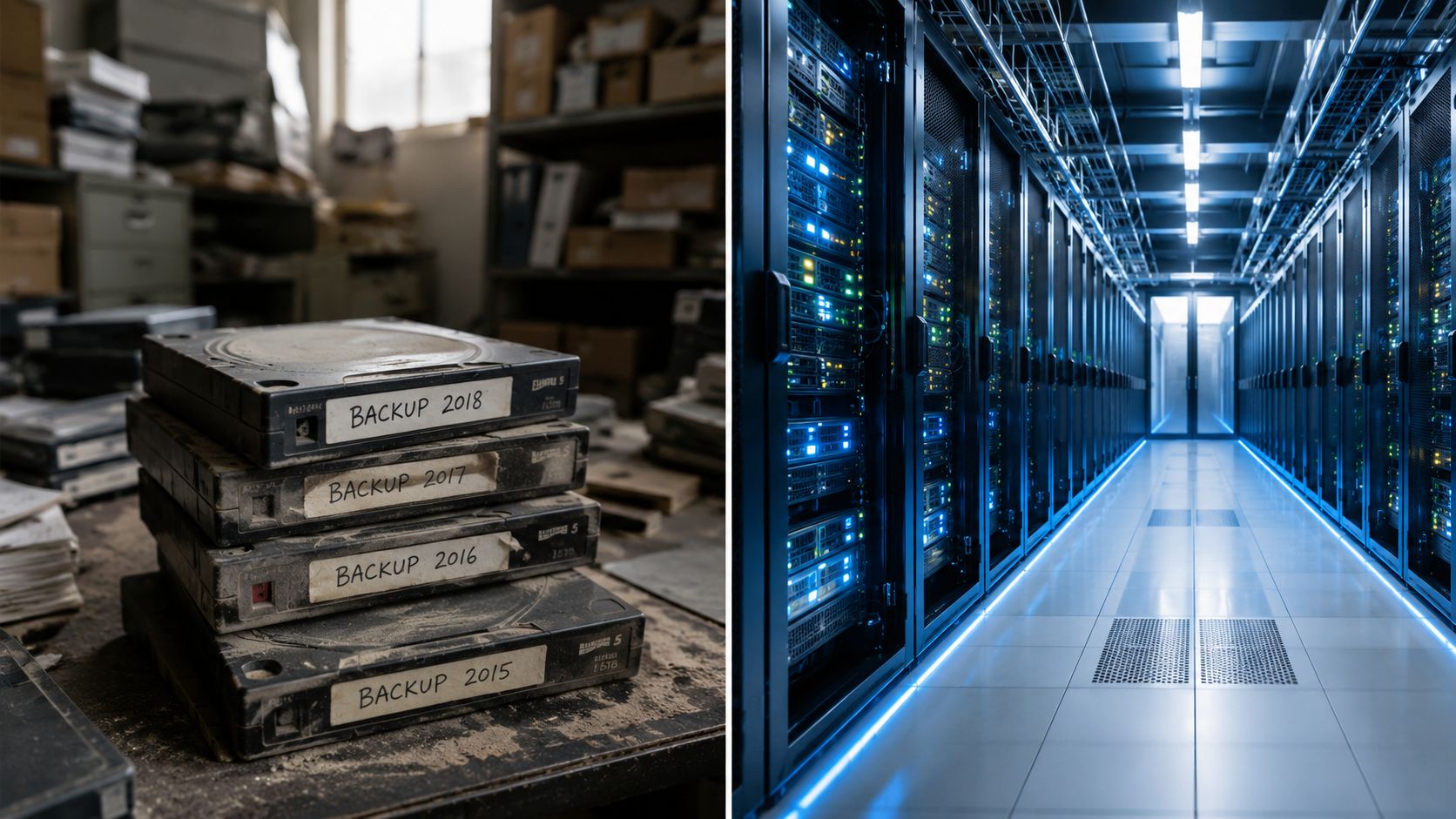
Backup protects files. DR restores the business.
Use this analogy. A backup is a spare tire in your trunk. Helpful, but limited. A disaster recovery capability is roadside assistance, a tow truck, a mechanic, and a replacement vehicle that gets you back on schedule.
That's the difference.
A true DR program answers questions backups alone can't solve:
- Which systems come back first so the company can operate
- Who makes the call to fail over or restore
- How remote staff reconnect securely during the outage
- What developers do if the production environment is unavailable
- How support teams communicate when normal channels break
If you want a useful outside explanation of how modern disaster recovery solutions support continuity, that resource gives a solid overview. The business takeaway is simpler. DR is about restoring capability, not just recovering files.
The practical components
A usable disaster recovery solution usually includes a mix of the following:
- Protected data copies: Backups, snapshots, or replicated workloads stored away from the primary failure point.
- Recovery environments: A place to run essential systems if your main environment fails.
- Runbooks: Clear instructions for failover, restoration, validation, and communication.
- People and ownership: Someone has to maintain policies, test them, and execute them under pressure.
- Support coverage: Your remote IT support model has to function during nights, weekends, and stressful incidents.
Recovery is never just a storage question. It's an operations question.
Why this matters for software-driven companies
If your company relies on custom software, SaaS integrations, cloud workloads, and distributed support, your disaster exposure multiplies. A restore that looks successful from an infrastructure perspective can still fail the business if APIs break, permissions don't sync, or developers don't know which dependency has to return first.
That's why smart owners tie disaster recovery to software development and support operations early. Waiting until after an outage guarantees confusion.
Comparing Key Disaster Recovery Models
You don't need the most advanced model. You need the model your team can manage, test, and use.
That's where many companies go wrong. They choose based on architecture diagrams instead of operational reality. If your staff is already stretched across day-to-day support, internal projects, vendor coordination, and development requests, a high-maintenance recovery model will decay fast.
Disaster Recovery Model Comparison
| Model | Initial Cost | Scalability | Management Burden | Best For |
|---|---|---|---|---|
| On-premise | High | Limited compared to cloud-based options | High | Organizations with strict internal control requirements and dedicated infrastructure staff |
| Cloud-based | Lower upfront than traditional site-based recovery | Strong | Moderate | Businesses that want flexibility, geographic redundancy, and easier scaling |
| Hybrid | Moderate to high | Strong | High | Companies balancing legacy systems with cloud workloads |
| DRaaS | Lower upfront entry point | Strong | Lower for internal teams | SMEs and growing firms that need recovery capability without building everything in-house |
On-premise still has a place
On-premise recovery gives you control. It can make sense if you run specialized systems, keep sensitive workloads under tight internal governance, or already maintain strong infrastructure operations.
But it's expensive to maintain well. It also puts a heavy burden on internal staff. Hardware, replication design, patching, testing, documentation, and secondary-site readiness all need attention. Many smaller companies do not have enough people for that.
Cloud-based and hybrid models fit modern operations
Cloud-based recovery is often the most practical move for businesses with distributed teams, remote support needs, and software environments that change often. It reduces the need for large capital investments and makes cross-location restoration more realistic.
Hybrid models work when you can't move everything at once. They're useful when some systems remain on-premise while others already live in the cloud. The tradeoff is complexity. Hybrid setups often create more coordination work because teams must recover across two operating models.
Why DRaaS is usually the smartest option for SMEs
For many smaller firms, Disaster Recovery as a Service is the best operational choice. Not because it's trendy. Because internal bandwidth is limited.
With DRaaS, you're not asking your existing staff to become part-time recovery architects, documentation managers, test coordinators, and after-hours responders. You shift a large portion of that burden to a partner who handles recovery operations as part of the service.
That matters if your internal people also support users, maintain cloud access, work on software releases, and resolve endpoint issues. A model that depends on spare time will fail.
Choose the recovery model your team can maintain under ordinary conditions. That's the only one that will work in an emergency.
My recommendation
For most SMEs, I recommend one of these two routes:
- Cloud-based DR if you have a capable internal IT lead and a relatively clean environment.
- DRaaS with external support ownership if your team is already overloaded.
If your company builds software, supports remote workers, and depends on quick issue response, prioritize low management burden over architectural vanity. The recovery model that looks elaborate on paper often collapses in real life because nobody has time to maintain it.
Understanding Core DR Metrics and Architectures
Two terms matter more than the rest in disaster recovery planning: RTO and RPO.
They sound technical, but they're really executive decisions.
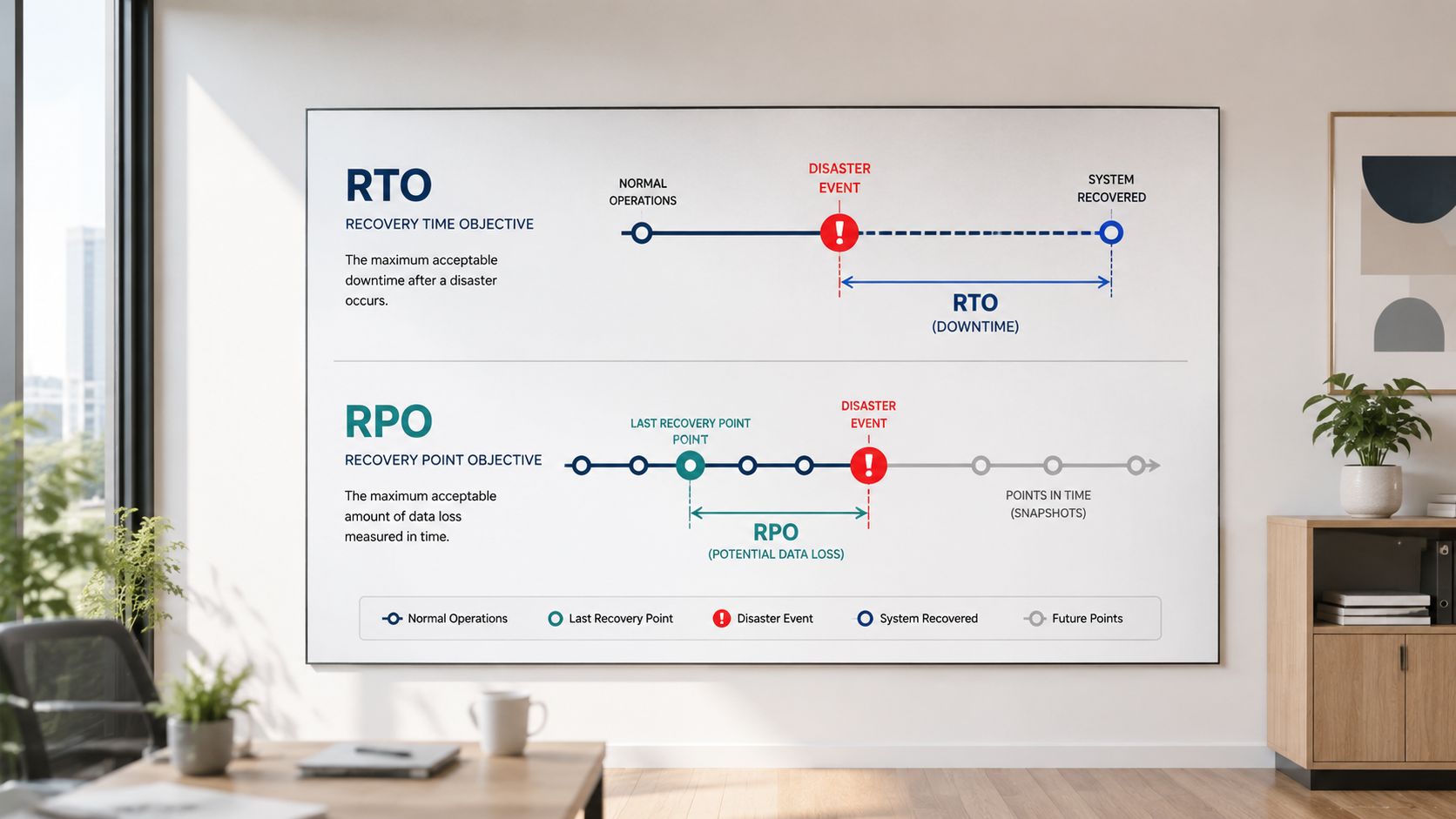
The questions behind the acronyms
Recovery Time Objective (RTO) means how long you can afford to be down.
Recovery Point Objective (RPO) means how much data you can afford to lose.
That's it. Strip away the jargon and those are the business questions.
The problem is that many owners answer them emotionally. They say they want near-instant recovery and zero data loss for everything. That's not strategy. That's fantasy budgeting.
According to the verified tier guidance, standard enterprise RTOs typically range from 15 minutes to 24 hours, while achieving near-zero data loss often requires continuous cloud replication and hot-site configurations that significantly increase cost. If you want a clearer framework for implementing effective RTOs, that guide is useful for thinking through practical targets. Businesses planning broader infrastructure transitions should also think about how recovery fits into data center migration strategy, because architecture choices made during migration often lock in future recovery performance.
Match architecture to business importance
Different recovery architectures support different business tolerances.
- Pilot light: Minimal critical infrastructure stays ready in a secondary environment. Good for lower-cost recovery where some delay is acceptable.
- Warm standby: A partially live secondary environment is maintained. Better for important systems that can't stay down long.
- Hot site: A near-live duplicate environment supports the fastest recovery and the least acceptable data loss, but costs much more.
Where owners overspend
Many businesses try to buy top-tier recovery for all workloads. That's a mistake.
Use a tiered approach instead:
- Mission-critical systems: Protect aggressively.
- Operationally important systems: Recover quickly, but don't overbuild.
- Secondary systems: Accept longer recovery windows and lower-cost methods.
If every application is “critical,” your plan isn't disciplined enough.
The right discussion isn't “What's the best technology?” It's “Which systems justify premium recovery, and which ones don't?” That's the conversation a serious outsourcing or support partner should force you to have.
A Stepwise Disaster Recovery Planning Checklist
Disaster recovery plans fail when they stay theoretical. You need a working checklist, named owners, and repeatable tests.
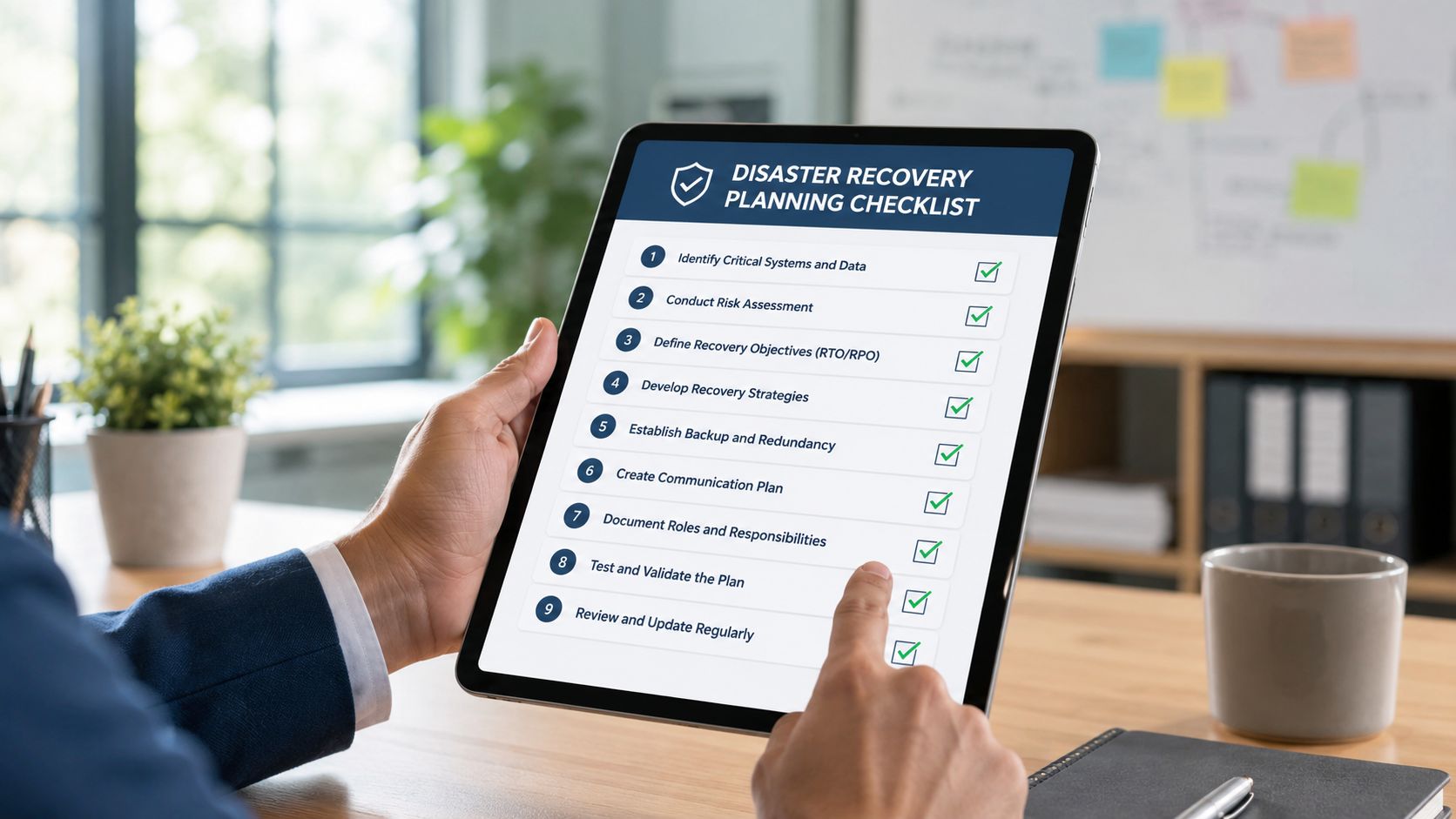
Start with business impact
Don't start with servers. Start with consequences.
Ask which business functions break first if systems go down. Sales? Billing? Customer support? Internal communication? Product delivery? For smaller companies moving into more resilient infrastructure, this often overlaps with broader cloud migration for small business, because recovery planning works best when designed into the target environment instead of patched on later.
Build the first version of your checklist around business operations:
- List essential services. Focus on what the company must keep running.
- Map supporting systems. Identify applications, databases, access controls, and file stores tied to those services.
- Assign priority. Decide what must return first, second, and later.
Build the recovery process
Once priorities are clear, design the actual recovery flow.
- Choose the model: Use on-premise, cloud-based, hybrid, or DRaaS based on internal capacity, not preference alone.
- Document failover steps: Spell out what happens when the primary environment fails.
- Document failback steps: Getting back to normal operations is often messier than the initial recovery.
- Define communication paths: Staff, customers, vendors, and leadership need clear updates.
- Set ownership: One person owns activation. Others own infrastructure, application checks, user access, and communications.
A useful operational reference during security-driven incidents is InsecureWeb's data breach protocol. It helps teams think clearly about actions and sequence after an incident, especially when recovery overlaps with containment.
Testing is where the truth shows up
This is the part most companies skip. It's also the part that matters most.
Verified guidance shows that disaster simulation drills are the most effective way to identify weaknesses, and SMEs should conduct DR drills at least twice annually, with testing being critical for validating templates and confirming that recovery objectives can be met.
Here's what those drills should expose:
- Configuration drift: The documented environment no longer matches what's deployed.
- Broken dependencies: A system restores, but the connected service doesn't.
- People gaps: The one employee who knows the process isn't available.
- Communication failures: Nobody knows who approves recovery or how updates go out.
- Remote support gaps: Offsite staff can't securely connect when they need to help.
A plan you haven't tested is just a document you hope will work.
What a usable checklist includes
A real checklist should be short enough to use under stress and detailed enough to prevent guessing.
- Activation criteria: What events trigger the DR process
- System order: Which applications and services come back first
- Access instructions: How admins, developers, and support staff authenticate during an incident
- Validation steps: How you confirm restored systems work
- Post-incident review: What changed, what failed, and what gets updated
If your checklist lives in one person's head, you don't have a disaster recovery plan. You have a dependency risk.
The SME Reality Gap Why Most DR Plans Fail
Most SMEs don't fail at disaster recovery because they don't care. They fail because the plan gradually becomes one more job nobody has time to own.
That's the reality gap.
A verified 2025 study reported that 61% of SMEs cited lack of internal expertise and no time to manage DR policies as the primary blockers, not technology cost, and that SMEs using outsourced talent for DR policy management reduced adoption abandonment by 47%, as noted in the CBTS discussion of managing disaster recovery solutions for the cloud.
The problem isn't the platform
Business owners often assume the answer is buying a better service. Usually, it isn't.
A core problem is operational ownership. In many SMEs, the same people handling user issues, vendor tickets, software deployment coordination, device setup, and compliance questions are also expected to maintain disaster recovery policies. That's unrealistic.
A DR plan needs recurring attention:
- Policy maintenance: Systems change, staff changes, and priorities change.
- Test scheduling: Someone has to organize and run drills.
- Documentation updates: Runbooks become stale fast.
- Training: Recovery fails when only one person knows the sequence.
Why outsourcing works better than wishful thinking
Here, outsourcing stops being a cost conversation and becomes a resilience decision.
If your internal team is spread across software development, remote IT support, user access, cloud administration, and business operations, you don't have excess capacity. You have hidden fragility.
An outsourcing model works because it gives disaster recovery an actual home. The partner can maintain documentation, coordinate testing, keep procedures current, and support incident execution without competing with your daily ticket queue.
The biggest DR risk for SMEs isn't weak technology. It's a plan with no owner.
That's the part many articles miss. They focus on backup design, replication frequency, and architecture patterns. Those matter. But if nobody is accountable for upkeep, the whole strategy degrades.
Bridge the Gap with a US-Based Outsourcing Partner
If you're serious about continuity, stop assigning disaster recovery as a side task to an already overloaded team.
The practical answer is to use an outsourcing partner that can support the full operating model. That means software development alignment, remote IT support coverage, documentation discipline, test coordination, and recovery execution. Not just a toolset.
A USA-based outsourcing partner gives you practical advantages that business owners feel immediately. Communication is easier. Escalations are cleaner. Time-zone overlap is better. Expectations around service, documentation, and accountability are more consistent. If you want outsourced support that fits the day-to-day reality of a growing business, it helps to understand what outsourced IT services for small business should cover beyond basic help desk work.
The right partner doesn't just restore systems after failure. They reduce the odds that your plan fails in the first place.
NineArchs LLC helps businesses close the disaster recovery execution gap with outsourced expertise across software development, remote IT support, and operational IT services. If your team needs a practical recovery strategy that can be maintained, tested, and used under pressure, contact NineArchs LLC at (310)800-1398 / (949) 861-1804 or email info@ninearchs.com.